Switch the load on a schedule and average the first seconds after each switch, and the P3 shows heat leaving the CPU area within 2 seconds, spreading over the next 20, at 7–15 mK noise. Per frame it resolves about 4 mK on a small patch once the jitter shared by the whole image is removed. The biggest error is the camera itself: hung from the laptop it watches, it warms by degrees with the load, and every pixel moves with it.
Thermal Master P3 hung from the top of an M5 MacBook's screen, looking down at the keyboard, recorded overnight on while the Mac's CPU was switched on and off on fixed schedules: 14 recordings, 311,000 frames (3.5 hours at 25 Hz). Builds on Reverse-engineered Thermal Master P3.
2 s
until heat shows at the keyboard after the load starts
3.7 mK
16×16 patch per frame, frame jitter removed (was 13.5)
3.1 mK
per pixel, lock-in over 29 load cycles of 20 s
+3.8 °C
the camera's own warming in 5 min of full load
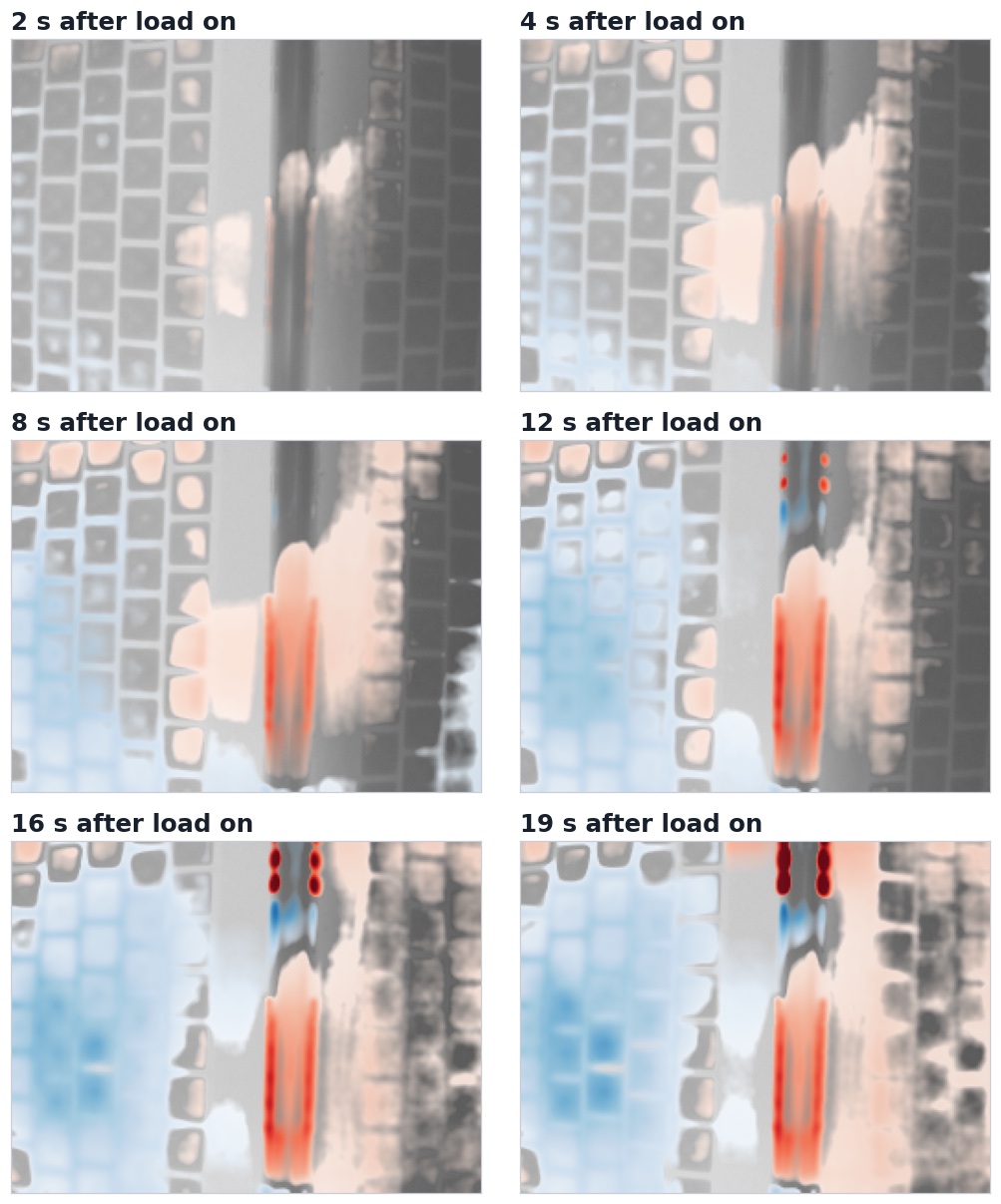
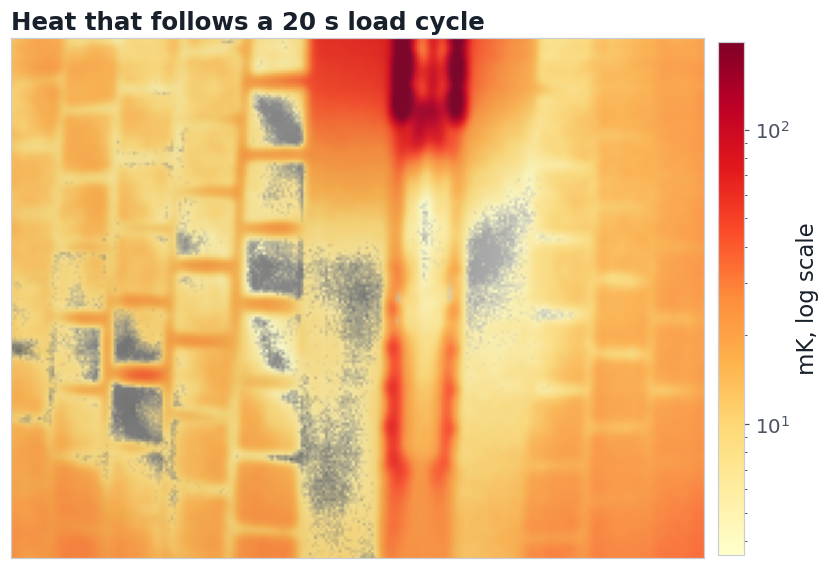
The first 20 s after the load starts, averaged over 7 starts: red where the keyboard warms, blue where it cools relative to the rest, grey where the change stays under 3× the noise (15 mK).
The setup: a keyboard, a camera above it, a load on a timer
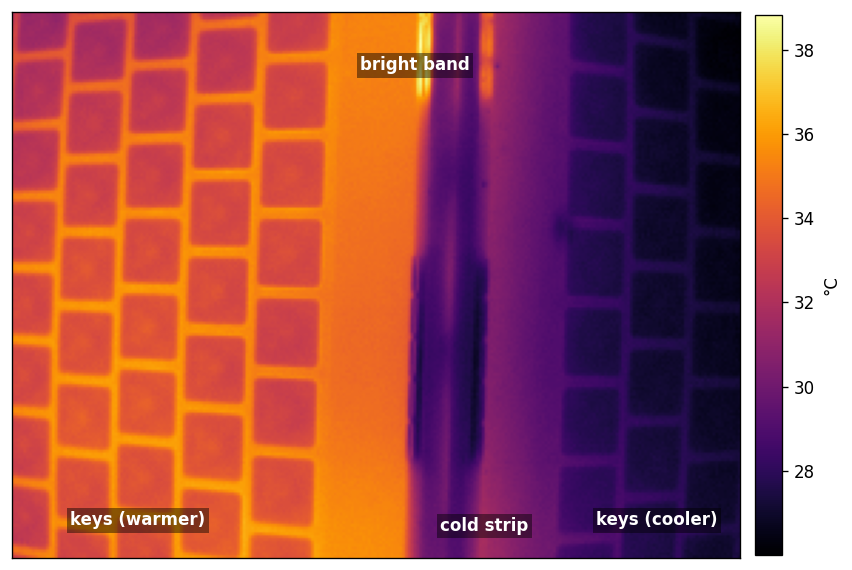
What the P3 sees: about 18 × 14 cm of keyboard, rotated.
The camera is clipped to the top of the screen bezel, lens down, about 25 cm from the keys. A script on the Mac ran float32 matrix multiplies on 16 of its 18 cores (or on one) on a square-wave schedule, logging every switch. The P3 streamed its lossless 16-bit frames from a Realme phone over Wi-Fi to the same Mac.
Two kinds of output were compared: the calibrated temperature plane (62.5 mK steps), and the raw 14-bit counts that skip the camera's lookup table (38.6 mK steps). Every recording logged the camera's focal-plane temperature, the Mac's CPU use each second, and the phone's battery.
Heat leaves the CPU area within 2 seconds and spreads for 20
Calibrated mode, 7 load starts averaged, 1 s per picture, 3σ threshold.
Heat first shows along the middle of the bright band and at its right edge, 1–2 s after the cores start. By 8 s a warm region fills the band and keeps spreading. Keys to the left turn faintly blue only because each picture is relative to its own median, which rises as the warm region grows.
Four small spots at the top of the band are something else. They change within a second of the switch, by about as much for one core as for 18, and they cool in a 20 s schedule but warm in a 120 s one. Heat conducted from the CPU would scale with its power and take seconds to arrive, so these are probably the Mac's fans or a reflection (not yet tested). Read them as a landmark, not as heat.
The trick that makes this clean is timing. The camera's own body is slow: for about 20 s after each start its temperature keeps drifting the way it was going (here down 0.3 °C), so the only fast change in those seconds is the keyboard's. Averaging that window over every start of a run (7 here) and subtracting each moment's image median (the camera's drift, since the early heat covers a few percent of the view) leaves the heat alone.
A shutter calibration just before each start makes it 2–3 times cleaner
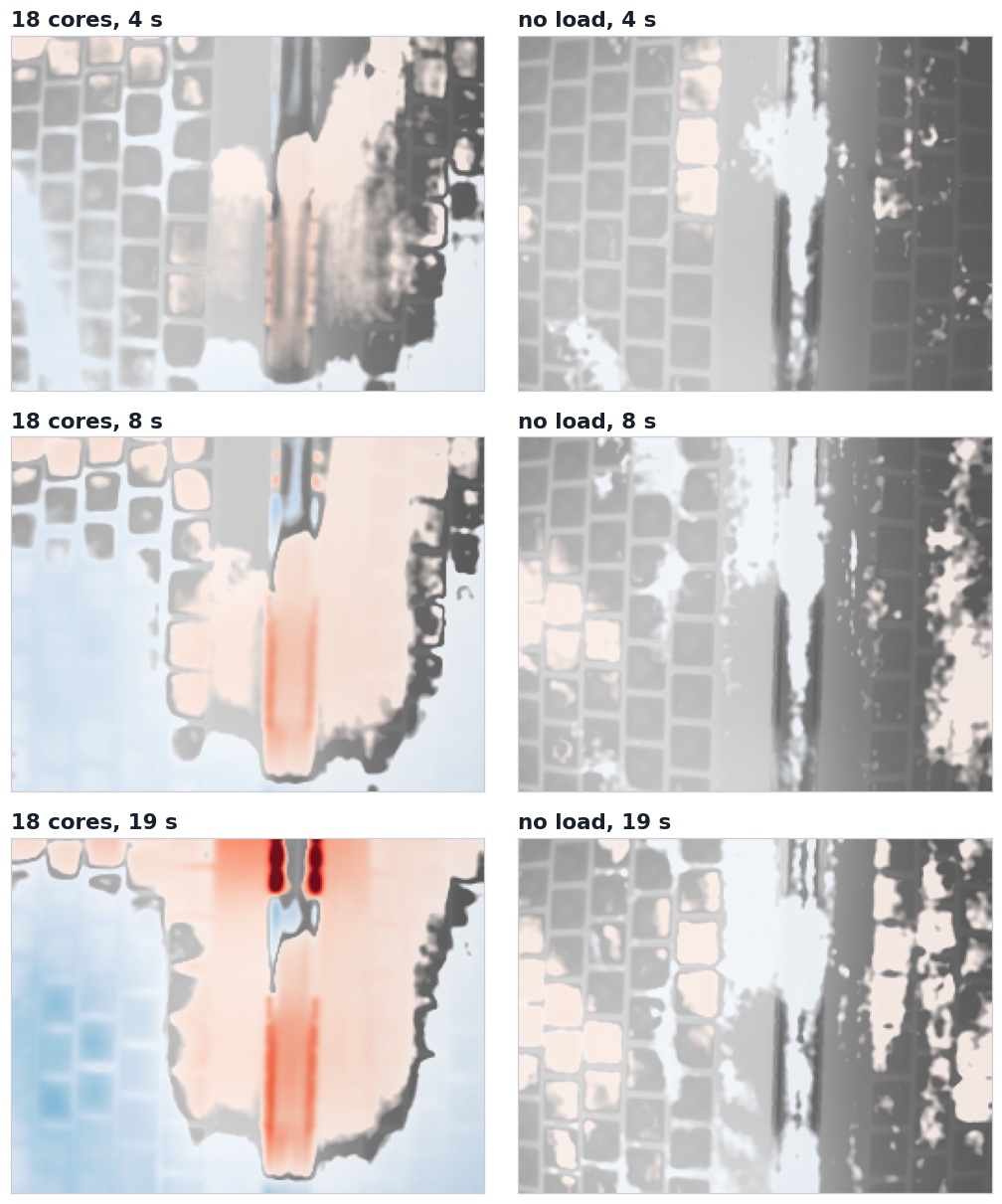
Shutter calibrated 5 s before each of 7 starts, both columns on one colour scale (±1 K). Left: 18 cores (σ ≈ 7 mK). Right: the same schedule with no load, the control (σ ≈ 3 mK).
In run T the camera recalibrated with its shutter 5 s before every load start, so each onset window began on a fresh calibration, before the camera could drift. The noise per 1 s picture fell to 6.9 mK over 7 starts, against 15 and 24 mK in two runs without it and 14 mK with factory settings. Heat now shows spreading from the band to the right across the keys within 8 s. Since the shutter's own settling is now in step with the load too, a control ran the same schedule with no load (right): its largest changes stay under 40 mK, against about 530 mK with the load, so at least nine tenths of the left column is heat.
Most of a frame's noise is shared by the whole image, and is removable
On a 16×16-pixel patch, three quarters of the frame-to-frame noise moves the whole image at once. Subtracting the image's own mean each frame (or a patch away from the heat) removes it. About 6 mK of that shared part is the camera's thermistor: the P3 corrects every frame with its focal-plane reading, so each flicker of that reading's last bit (about 15 mK per step) shifts all pixels together.
Noise per frame, 16×16 patch, raw mode (mK): each strategy alone, then combined
as recorded
13.5
thermistor flicker removed
12.1
frames averaged in even+odd pairs
8.8
thermistor removed + whole-image mean subtracted
3.7
One pixel: 26 mK per frame, 20 mK with the shared part removed. A 48×48 patch: 3.2 mK.
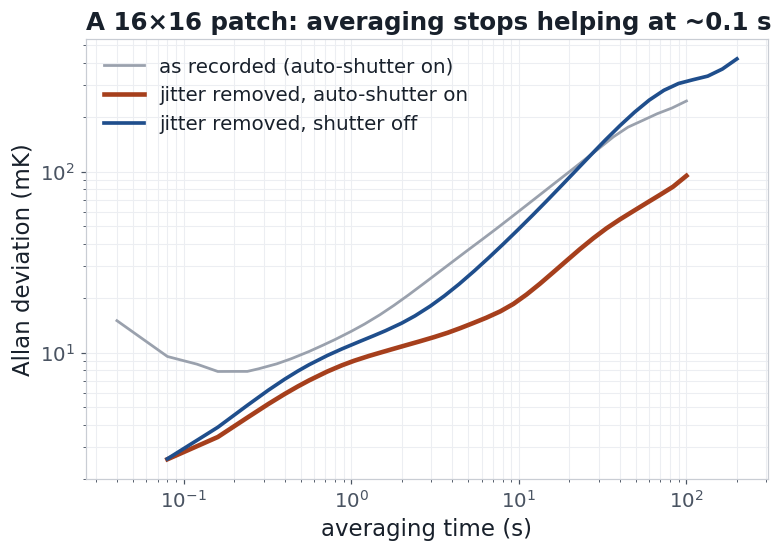
Averaging a 16×16 patch helps only to about 0.1 s (2.5 mK). With the camera's auto-shutter off, the drift beyond 10 s is 2.5–3.5 times larger. No load, 5–10 min each.
The rise after 0.1 s is not camera noise: the Mac never stops working (indexing, sync, other agents), so the keys wander by about 10 mK within a second and 100 mK within a minute. That is the useful lesson for the lab too: a slow average can only be as steady as the thing being watched. To see a small change, make it happen on a schedule, and measure in step with it.
The camera heats with the laptop, and every pixel follows the camera
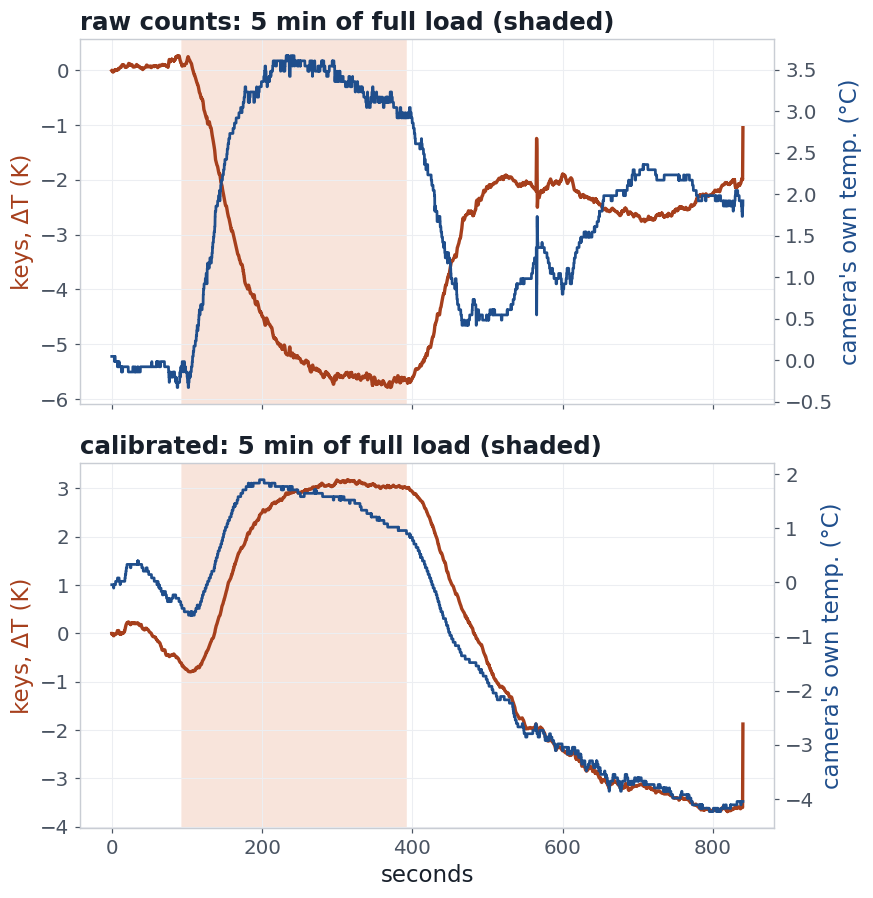
The same 5-minute full load, recorded twice. Raw counts: the keys "cool" 5.7 K while the camera warms 3.5 °C. Calibrated: the keys rise and fall almost in step with the camera.
The P3 hangs from the screen bezel, which warms when the M5 works hard, so the camera's own temperature follows the load: up 2.4–3.8 °C in 5 minutes, and back down by 4–6 °C afterwards. Raw counts move 400–700 mK per degree, opposite to real heat. The calibrated output was supposed to fix that; with the auto-shutter off it moves about +0.4–0.6 K per degree instead, now in the same direction as real heat, which is worse because it can't be told apart. The camera's correction only works through its shutter, and even the factory auto-shutter left most of the artifact in place (below). The fix is mechanical: keep the camera's temperature still.
Lock-in to the load finds the heat; a short period keeps the camera out of it
Each pixel's series was fitted with a sine and cosine at the load's frequency, plus a slow trend in the same fit (never a high-pass filter first). At a 120 s period the camera's focal plane swings ±0.79 °C, peaking 80 s after each load-on, and most of what the pixels show is that. At a 20 s period it moves only ±0.004–0.025 °C: the camera body is too slow to follow, and what remains is mostly the keyboard.
Load period, cycles
Camera swing at that period
Median pixel response
Noise per pixel
Pixels above 5σ
120 s × 9 (raw)
±0.79 °C
483 mK, mostly the camera
30 mK
100%
20 s × 29 (raw)
±0.004 °C
12.8 mK
4.5 mK
13% (42% above 3σ)
20 s × 29 (calibrated)
±0.025 °C
17.6 mK*
3.1 mK
65%
* In calibrated mode even the camera's ±0.025 °C could be worth up to 15 mK, and at 20 s its timing is too close to the heat's to split them.
Where each 20 s load cycle shows up: over 100 mK at the top of the bright band, tens of mK across the keys; grey where it stays under 3σ. Raw mode, 29 cycles. The strongest stripe at the top is the four spots, which are probably not CPU heat (see above).
Phase separates real heat from the camera's own
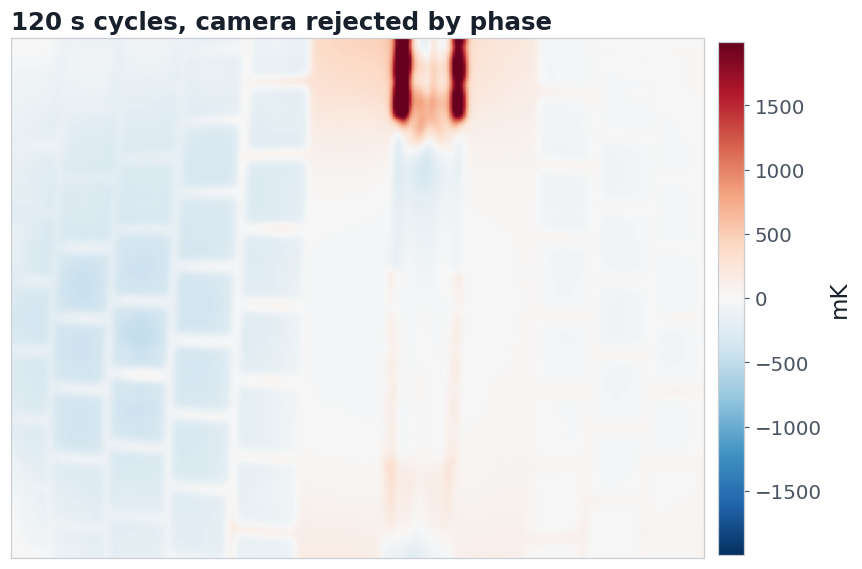
At the slow period the artifact can still be removed. The camera's warming reaches every pixel with one timing, the focal plane's, only its size and sign differ. Keeping the part of each pixel's response that is perpendicular to the focal-plane phase removes it whatever its size; real heat, which arrives with its own timing, survives. That turns the 120 s run's map from a wash into a few hundred mK on the keys, plus the four spots at the top, which stand out at every period and load and are probably not CPU heat.
120 s cycles, raw mode, with the part in step with the camera's own temperature removed: the stripes at the top (the four spots) swing by up to 2 K each cycle; the keys stay within a few hundred mK.
The second campaign: calibrated mode, shutter timing, factory settings, one core
The camera's calibrated output is meant to correct for its own temperature. Without its shutter it does not: in a 10-minute no-load baseline its focal plane warmed 2.1 °C and the whole image rose with it (about +0.4–0.6 K per degree). At a 120 s load period its swing (±0.77 °C, peaking 75 s after each start) still dominates the pixels, and rejecting it by phase again leaves the four spots at the top. Its clear wins are the onset views above and the lowest per-pixel lock-in noise at 20 s.
Run (load cycles)
Camera swing
Median response, camera part / rest
Lock-in noise per pixel
Onset noise, 1 s picture
Calibrated, shutter off, 120 s (7; recorded twice)
±0.77–0.79 °C
376–383 / 69–96 mK
26–41 mK
15–24 mK
Calibrated, shutter 5 s before each start, 120 s (7)
±0.83 °C
419 / 115 mK
25 mK
6.9 mK
Factory: auto-shutter and noise filters, 120 s (5)
±0.69 °C
321 / 72 mK
22 mK
14 mK
Calibrated, one core instead of 18, 120 s (7)
±0.11 °C
111 / 57 mK
30 mK
7.8 mK†
Control: shutter 5 s before each start, no load, 120 s (7)
±0.05 °C
31 / 6 mK
14 mK
2.8 mK
Calibrated, 20 s (29)
±0.025 °C
17.6 mK in all*
3.1 mK
9.9 mK
* Too close in timing to split at 20 s. † Nothing in the first 8 s repeats from start to start.
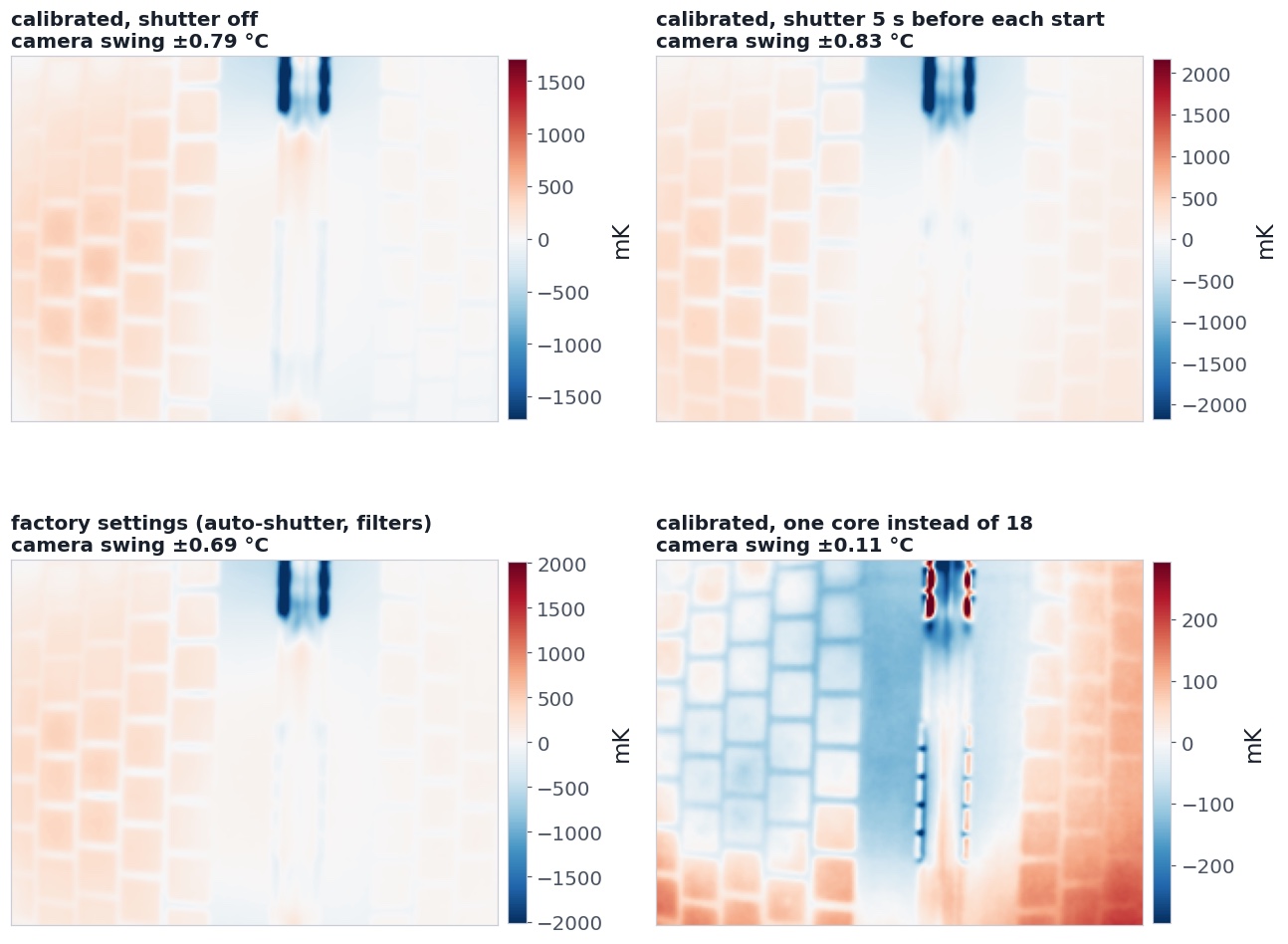
What is left at a 120 s period once the part in step with the camera's own temperature is removed. Each map has its own scale; the one-core map's is seven times smaller.
Timing the shutter to the load does not stop the slow artifact. The camera still swings ±0.83 °C a cycle; the calibration resets the offsets once a cycle, but the drift within it stays. Its value is the onset view above.
Factory settings are no worse for slow work. The auto-shutter and the camera's noise filters gave the lowest lock-in noise at 120 s (22 mK) and a slightly smaller camera share.
One core is below what this mount can separate. The camera still swings ±0.11 °C at 120 s, which accounts for most of the 140 mK median response, and the first 8 s after each start show nothing that repeats from start to start. Only the four spots respond in full, more evidence that they are not CPU heat.
Calibrated beats raw at 20 s: 3.1 against 4.5 mK per pixel, at the same 29 cycles.
The shutter alone leaves a small periodic trace. With no load, a shutter every 120 s still gives a 31 mK response at that period, so in a lock-in the timed shutter adds about 6% to an 18-core signal.
What to do, in order
#
Strategy
What it buys here
Cost
1
Mount the camera off the thing it watches
Removes the largest error: 0.4–0.7 K per °C of camera warming, in every mode
A stand or bracket
2
Drive the heat on a schedule and lock in to it
3.1–4.5 mK per pixel in 10 min; rejects everything not in step
A controllable load
3
Average the first seconds after each start
Heat flow as pictures, at 7–15 mK, before the camera's body reacts
Many repeats
4
Calibrate the shutter just before each start
Onset noise 15–24 → 7 mK
A shutter click per cycle
5
Modulate faster than the camera body follows
Camera swing falls from ±0.79 °C (120 s) to ±0.004–0.025 °C (20 s)
Less depth: shallower heat
6
Subtract the whole-image jitter each frame
13.5 → 3.7 mK per frame on a 16×16 patch
Needs pixels away from the heat
7
Reject the camera by phase
Turns a slow, camera-dominated map into the real hot spot
Needs the camera's temperature log
8
Average patches, not just frames
26 mK per pixel → 3.2 mK on 48×48, per frame
Resolution
9
Drop glitch frames before statistics
The P3 sends rare frames several kelvin off; they dominate any mean or Allan curve
A robust threshold
10
Raw 14-bit counts
Finer steps (38.6 vs 62.5 mK), but no correction for the camera's temperature
Only for fast, differential work
The phone app got sturdier along the way (1.3.0, deployed over Wi-Fi)
Camera settings survive a reconnect. After a USB blip the camera came back on its defaults while the app reported the old ones; settings are now saved and re-sent on every connect.
No more crash after a reboot or update. Android 14+ refuses a camera-type foreground service started in the background; the service now falls back to USB-only instead of dying.
Status tells the truth./api/status and /health report fps 0 and not streaming once frames stop (new lastFrameAgeMs).
The web server rebinds itself after a failed bind or accept, instead of disappearing for good.
No more retry storms. Spacesheep publishing backs off (to 60 s, and full restarts to 10 min); an RGB failure no longer restarts the thermal stream every 22 s.
Battery. The screen no longer stays on by default, and the phone camera can be switched off (?action=rgb&enabled=0, ?action=screen&keep_on=1); on the hub's 500 mA the drain went from about 17% an hour to 4% an hour.
The register probe needs confirm=1: a stray GET could send hundreds of vendor commands, including classes that wedge the camera.
Next
Mount the camera on its own stand, then repeat the 120 s lock-in: the camera artifact should vanish.
Identify the four spots: log the fan speed alongside a run (needs sudo powermetrics), or cover them with matte tape and see whether they move.
Matte tape on the area of interest (shiny metal reflects the room), and a passive reference block in view.
For the board in the lab: modulate slowly enough to get through 1.6 mm of FR-4 (around 0.003–0.03 Hz); lateral blur through the board is then about 2 mm.
The hub gives the phone only 500 mA; a powered PD supply is still the real fix for the battery.
Methods, code and sources
Code: ~/git/thermal-android/experiments/sensitivity/ (recorder, load generator, campaign runner, analysis, figures). Recordings are lossless 16-bit frames with the camera's InfoLine, timed by the camera's frame counter; lock-in fits include a quadratic trend; noise beside the drive frequency estimates each pixel's error. Allan deviation is overlapping. Every run's settings were set explicitly before it and watched during it; runs disturbed by app restarts or other agents were flagged.